#1 EML Converter App for macOS

Mac EML Converter

MacMister EML Converter for Mac converts EML and EMLX files to PST, PDF, MBOX, MSG, HTML, CSV and other supported formats, as well as Gmail, Microsoft 365, IMAP and other email platforms. Batch convert multiple EML files while preserving attachments, email properties and the original folder structure.

4.5/5 Based on 1500 Reviews
Batch EML & EMLX Conversion
15+ Export Options
Preserves Attachments
Maintains Folder Structure
100% Secure Safe & Trusted
30-Day Money Back Hassle-Free Guarantee
Free Updates Product Updates
24/7 Support Expert Assistance
EML Conversion software for Mac

#1 Rated EML Converter for Mac

Convert EML, EMLx files with all email data & details preservation using Mac EML Converter.

  • Supports bulk conversion of .eml or .emlx files on Mac at one time.
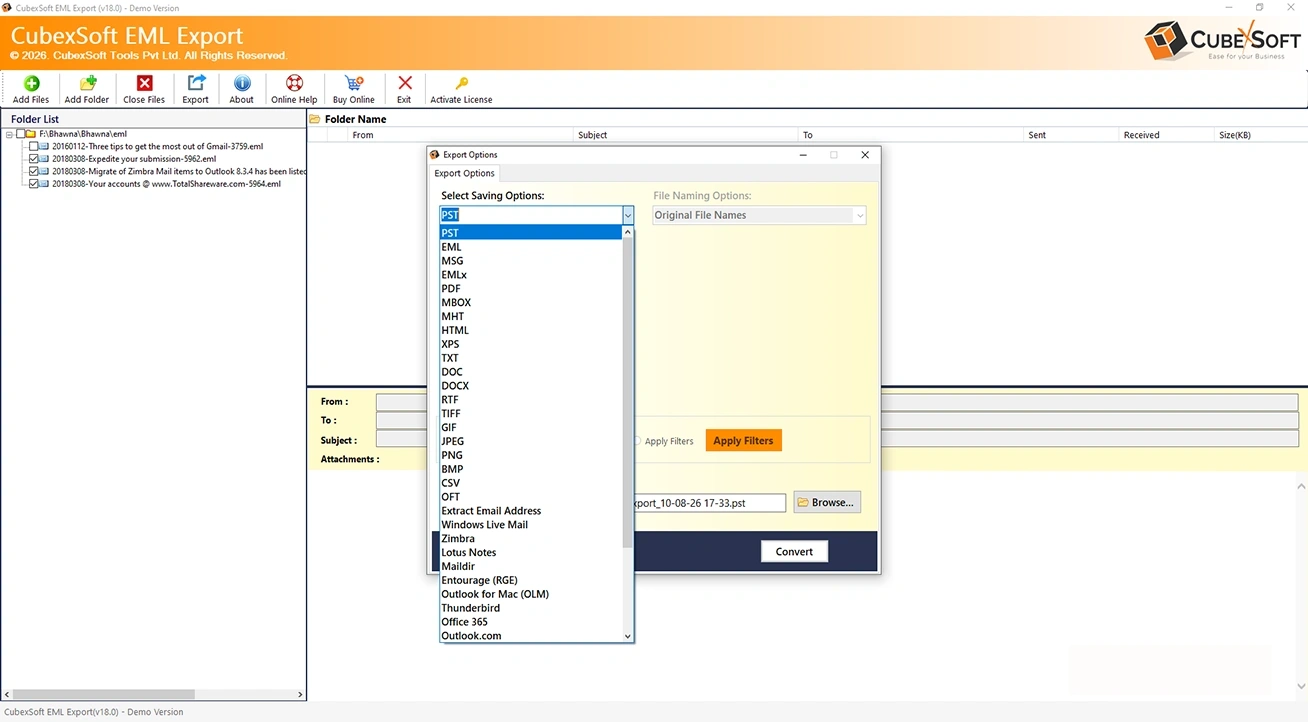
  • Convert EML, EMLx to file formats like PST, PDF, MSG, MBOX, HTML, CSV etc.
  • Export EMLx, EML to Thunderbird, IMAP, Gmail, O365, Outlook.com.
  • Able to save single as well multiple EML/EMLx files at a time.
  • Provides file naming options to appropriately manage converted data.
  • Directly convert EML, EMLx files along with all attachments precisely.
  • There is no file size restriction for migration of EML, EMLx files.
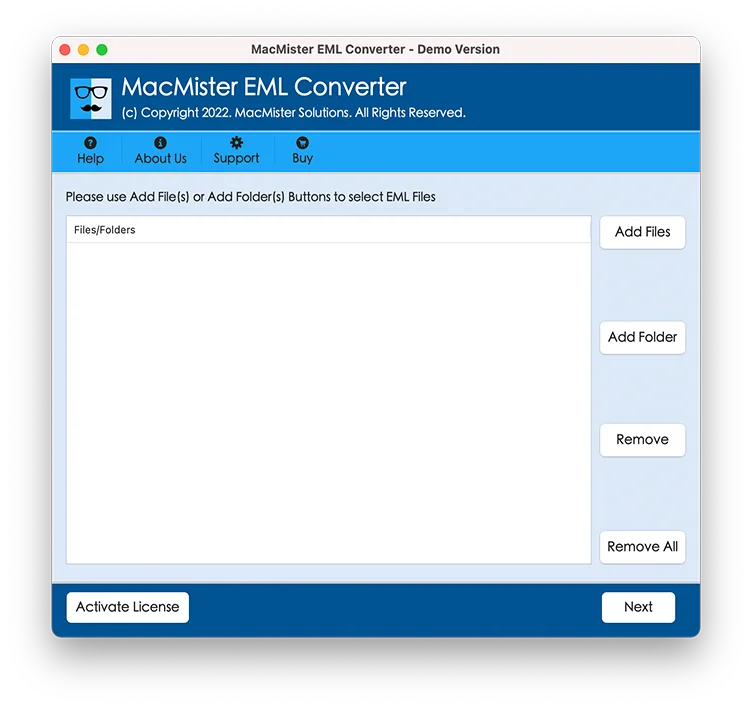
  • EML Converter for Mac has user-friendly & simple to use GUI
  • Runs smoothly on all editions of Mac OS plus latest Mac OS 12 Monterey
  • Trial edition allows users to convert 25 EML files for free
Powerful Features

Advanced Features of Mac EML Converter Software

Explore the key features designed to convert eml, emlx files with MacMister EML Converter.

Export EML Files to Multiple File

The Mac EML Converter Tool is a fantastic solution to transfer EML files to multiple file formats. This migration utility preserves all information during the complete task. With this, one can export EML emails to numerous file formats like PST, EML/EMLX, MSG, HTML, MHT, CSV, MBOX, Thunderbird, DOC, Plain Text, IMAP.

Supports Batch Conversion of EML/EMLx Files

EML Converter for Mac Tool saves a lot of users’ time and energy by providing batch conversion facility to save, import, convert, and print .eml files. With the help of this smart option, users can print multiple EML files in a single go. Users can effortlessly perform batch migration of EML emails to needed file formats including all attachments.

Dual Modes to Upload EML Data

EMLx Converter for Mac is a fantastic software which enables users to print EML files to various file formats at one time. Users can browse EML/EMLx files in dual modes like Add File (s) or Add Folders (s). The Add Folders option helps to choose a folder containing multiple EML files whereas the Add File option allows to choose single or multiple files at a time.

Save EML File with Attachments

Using this amazing EML Converter for Mac, users can simply import EML emails along with all attachments without any trouble. Mac EML Converter Tool is a professional application that maintains the EML file attachments safe throughout the conversion task and performs EML file conversion without any loss of data.

Select Desired Location for Resultant Data

EMLx Converter for Mac automatically selects desktop as its destination location but you can click on the "Browse" tab if you do not want the output data saved on your system screen. After browsing the desired path, press the Export button to start the EML file conversion task. The software shows the live processing of EML files during the task.

Maintains Original Folder Hierarchy

Mac EML Converter Tool guarantees to keep the EML folder structure even after the whole conversion process. While the file formats changed, email attachment, email content, and all email elements like to, cc, bcc, from, sent/receive, date or time etc. remain the same, which gives ease of data access after EML files migration.

Compatible with All Mac OS Editions

The Mac EMLx Converter Tool is capable to run on latest and below editions of Mac OS like Mac OS 10.15 Catalina, 10.14 Mojave, 10.13 High Sierra, 10.12 Sierra, OS X 10.11 El Capitan, 10.10 Yosemite, 10.9 Mavericks, 10.8 Mountain, etc. Moreover, there is no file size and amount restriction imposed by this conversion utility to print multiple EML files to a specific file format.

Why it matters

Why Convert EML Files on Mac?

Make saved emails easier to move, share, and use. Choose a format that fits where your messages need to go next.

Move to another email application

Need Outlook-compatible PST files? Use our Mac EML to PST Converter to convert EML and EMLX files to PST on macOS. You can also choose MBOX when you need a mailbox-format output.

PSTMBOX

Create printable email records

Need portable copies of your saved emails? Use our Mac EML to PDF Converter to convert EML and EMLX files into PDF documents for convenient reading, printing, and sharing.

PDF

Transfer emails to an online account

Bring saved messages into a supported email account so you can access them with your other mail.

GmailMicrosoft 365IMAP

Read messages in a web browser

Save email content as HTML for viewing without opening the original EML file in a mail application.

HTML
Email details that matter

What Email Information Is Preserved?

Keep important message details together when converting EML and EMLX files. Choose an output that supports the information you need.

Message content & subject

Keep the email's subject and message text so the conversation remains readable and identifiable.

Senders & recipients

Retain From, To, Cc, and Bcc details when they are present in the source email.

Email date & time

Preserve available date and time information to keep the original context of each message.

Email attachments

Include files attached to your messages using the attachment handling available for your chosen output.

Formatting & inline content

Keep supported styling, hyperlinks, and inline images in outputs that support rich email content.

Folder organization

Maintain the source folder hierarchy in supported outputs to make converted emails easier to navigate.

Preservation depends on the output format. Plain text and CSV do not retain the full visual email layout. Test a sample with the free demo to check formatting, attachments, and folder structure.

Download & Specifications

Mac EML Converter – System Requirements

Review system requirements and demo limitations before installing EML Converter for Mac.

Software Download

Mac EML Converter

You can test the application by downloading the free demo of the tool that allows to convert the first 25 files from each EML folder to selected file format free of cost.

Download Size 18.1 MB
Version 1.0
License Free Demo
100% Secure 30-Day Money Back 24/7 Support
Technical Information

System Requirements

Processor Intel® Pentium 1 GHz (x86/x64) or equivalent
RAM Minimum 512 MB is required.
Hard Disk Space Minimum 50 MB of free disk space required.
Supported macOS Tahoe, Sequoia, Sonoma, Ventura, Monterey, Big Sur, Catalina (MacOS X 10.15), Mojave (MacOS X 10.14), High Sierra (MacOS X 10.13) and all below Versions.
Free Demo Limitation Convert up to 25 items from each eml folder.
Compare Editions

EMLx / EML Converter for Mac : Trial vs Full Version

Explore the Difference Between Free and Full Version of EML Converter for Mac

Features Trial Version Full Version
Load Multiple EML Files and Folders 25 Items / Folder Unlimited
Batch Convert Outlook EML Files
Selective Files Conversion
Maintains Email Formatting & Metadata
Preserves Folder Hierarchy
Export Large EML Files
Supports all Mac OS Versions
24×7 Technical Support
Priority Technical Service
Price Free $29
Download Free Buy Full Version
Step-by-Step Guide

Working Tutorial of Mac EML Converter

Follow the simple steps to convert EML, EMLx files on mac machine.

Preview: Step 1 of 4
launch the app
Did you know? You can add multiple EML files or complete folders for batch conversion.
100% Secure Source EML files remains unchanged
No Data Loss Every data, details remains intact
Fast Conversion Guided workflow for EML Conversion for mac
24/7 Support Get product assistance whenever required
Related FAQs

Frequently Asked Questions of EML Converter for Mac

Get all answers to common questions about EML Converter for Mac, supported data, trial limitations and software usage.

With this amazing Mac conversion application, one can easily print, save, export, import, and convert multiple EML files to the desired output format in a single go.
The trial edition of Mac EML Converter imports only 25 EML files to other file formats whereas the license edition allows multiple file conversion.
Yes, the EMLx Converter Tool for Mac works on all latest and below editions of Mac OS including latest Mac OS 12 Monterey.
Definitely not, there is no file size limitation. You can instantly print multiple EML files in a single round without facing any issues.
Yes, the MacMister EMLx Converter Software allows you to import both .eml and .emlx files without any trouble.
Yes, You can install this application into your MacBook to perform EML / EMLx file conversion in a safe and secure way.
Yes, one can download and use this Mac EML Converter Tool on the Mac Operating System and it allows you to directly convert EML files into IMAP Server.
Customer Reviews

What They Say About EML Converter for Mac

Verified Reviews for EML Converter for Mac by our Top Clients

★★★★★
Verified User
I was looking for a quick solution to convert EML files to different popular file formats. One of my friend told me to utilize the free demo edition of MacMister EMLx Converter. After the evaluation of the trial edition, I decided to purchase the full edition of this app.
RK
Jamie USA
★★★★★
Verified User
With the use of this EML Converter Tool for Mac, I was able to export my EML files. I tried many other software’s but this program is so simple and amazing. Plus it saved my EML files without any problem. A perfect software that can save multiple EML files within seconds. A big thanks to the developer team of MacMister.
SM
Jadon Scotland
★★★★★
Verified User
A wonderful trustworthy and time-saving application. Used various conversion programs, but none worked well. And this is the only Mac EMLx Converter Software I utilized to import all my .eml or .emlx files to PST format.
AJ
Emma UK
4.8
★★★★★
Based on customer feedback
Secure Processing Reliable App Good Support

Ready to Convert EML, EMLx Files?

Download the free demo of the Mac EML Converter software and evaluate the conversion output before purchasing the full version.