How to Transfer and Import Yahoo Mail to Hotmail on Mac & Windows?
Are you facing issues with Yahoo Mail webmail service and thinking about moving to Hotmail from the same? But worried about accessing emails stored on Yahoo into Hotmail? Looking for a secure and trouble-free approach to import Yahoo email to Hotmail on Mac and Windows? No worries, just go through the solution mentioned in the following segment as it will help you to successfully transfer and import Yahoo email to Hotmail on Mac and Windows without data loss. But at first, let us understand little bit about Yahoo and Hotmail and the reasons behind the migration between Yahoo and Hotmail.
Both Hotmail and Yahoo are popular webmail services and they are very much similar in multiple ways. People get confused sometimes as they not able to decide which service is best to opt and thus they constantly comparing the services to discover the appropriate and suitable one.
Let’s Check out the Comparison between Hotmail and Yahoo Mail –
| Hotmail | Yahoo Mail | |
| What it is: | Free Service offered by Microsoft | Popular cloud-based webmail service provider. |
| Initial Release: | Hotmail was first introduced on 4th July 1996. | Yahoo Mail was launched on 8th October 1997 |
| Social Platforms Connectivity: | Ability to link with multiple social networking sites such as Skype, LinkedIn, Twitter, and Google. | Supports only few platforms. |
| Mail Access Features: | Exchange ActiveSync (EAS), POP | IMAP, POP |
| Account Expiration: | After 9 months duration. | After 6+2 months |
| Cost: | For free (Ad-free Hotmail costs $19.95 per year) | For Free (Yahoo Mail Plus charge $19.99 a year) |
| Attachment Limit: | 25 MB (After that through SkyDrive). | Supports only 25 MB. |
More Facts to Know about Yahoo and Hotmail
- Hotmail was first came into existence on 4th July 1996 and Yahoo Mail on 8th October 1997.
- Yahoo was first founded by David Filo and Jerry Yang whereas Hotmail was created by Sabeer Bhatia and Jack Smith.
- Yahoo Mail supports 1TB of mailbox storage but no additional storage capacity will be given. Hotmail, on the other hand, offers 15 GB but equipped with SkyDrive for sending and storing large amount of files.
- Hotmail includes small number of adverts which are not bothersome to users. But, Yahoo Mail has several distracting banner ads that makes lot of people annoyed.
- Live Hotmail delivers the advantage of connecting many different social media platforms such as LinkedIn, Twitter, Skype, and Google whereas Yahoo Mail does has limited platforms to connect.
How to Import Yahoo Mail to Hotmail on Mac and Windows?
MacMister Yahoo Backup Tool for Mac is a perfect approach for importing multiple Yahoo emails to Hotmail on Mac and Windows with attachments. The software is simple and user-friendly. Any technical and novice users can utilize the solution without any difficulty and implement the desired task in minimum time. Even, the tool will make sure to maintain the originality of Yahoo emails throughout process.
Moreover, the features in the application will allow users to save emails from Yahoo to Hotmail according to specific needs. And, this can be experienced by users with the help of free demo as it allows to import first 25 Yahoo emails to Hotmail with attachments free of cost.
Working Steps to Import Yahoo Mail to Hotmail on Mac
Step 1. Download, launch and run Yahoo to Hotmail Backup Tool for Mac on macOS.
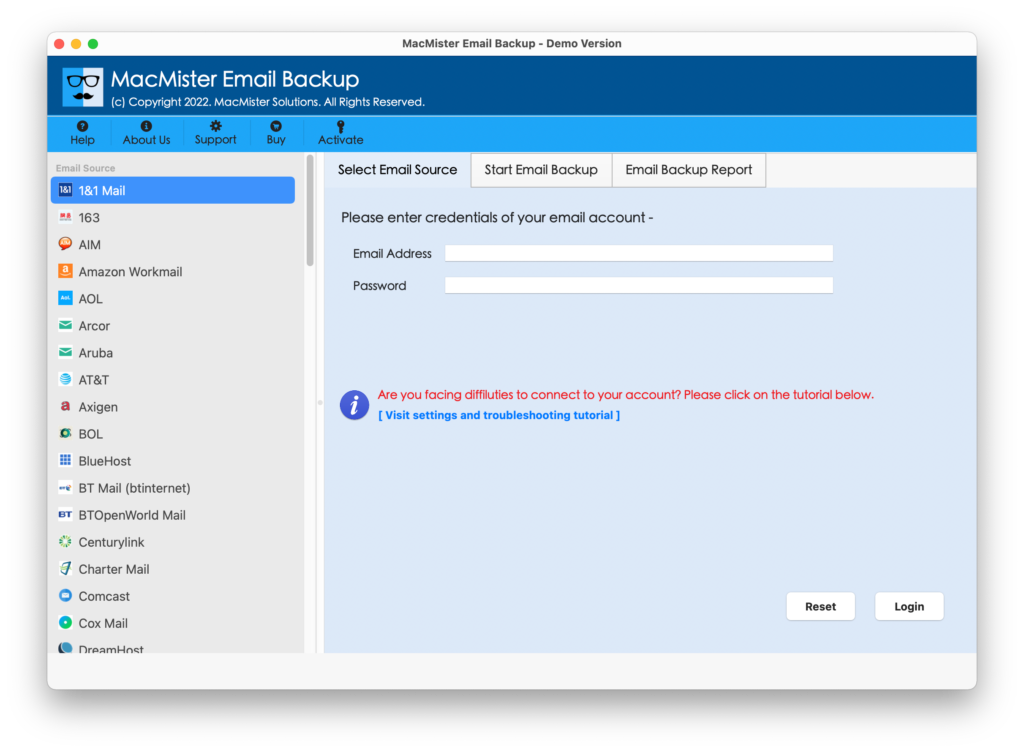
Step 2. Add Yahoo account on the app by choosing Yahoo option from the left webmail source list. Enter Yahoo email ID and App Password and click on Login button.

Step 3. The Yahoo account will successfully added and start showing its mailboxes on the software pane.

Step 4. Go to Select Saving Options property to choose Outlook.com option from the list.

Step 5. Provide Outlook.com login credentials in required fields. You can also use Filters section to import selective Yahoo emails to Hotmail on Mac. When done, click on Start Backup.

Step 6. The Email Backup Report screen will appear that will show the current migration progress of Yahoo emails to Hotmail.

The complete procedure will end within seconds and show “Process Completed” pop-up to users. Click OK and quickly go to Hotmail account to check the resultant files. After opening them, you will see that the email content is totally accurate and appearing without modification.
Why Yahoo to Hotmail Solution is the Best Choice?
There are plenty of reasons for choosing the application and some of them are listed here:
Direct Yahoo to Hotmail Migration is Possible
The software is equipped with a direct migration facility. Users only need to enter the required credentials in the necessary fields that will be shown when user selects Yahoo as a webmail source and Hotmail as a destination. After this, one can click on Start Backup to directly access all emails from Yahoo account to Hotmail.
Take Help of Filters to Import Selective Emails
The application has Advanced Filters option that includes date range, to, from, subject, and many other options. By applying them as per suitability, users will be able to save Yahoo emails to Hotmail according to specific date, month, email address, subject, etc.
Protects Original Yahoo Account Details of Users
The utility protects the Yahoo’s original account details of users. Because, the tool requires App Password of Yahoo account instead of main password. By entering the same, users’ actual password will remain safe and the entire procedure will be performed securely with the help of App password.
Simple friendly Interface & Easy Operational Steps
The program is built-up with a simplified functioning and so its interface is easily manageable and equipped with few easy step procedure. Anyone can immediately operate the software steps and import Yahoo Mail to Hotmail within seconds without facing any loss of data.
Utilize the Software on all Mac and Windows OS
The software is available in two versions – one is for Mac users and another for Windows. All their earlier and latest versions are supported. Mac users can download and operate the tool on macOS Ventura, Monterey, Big Sur, Catalina, etc. Windows users can perform the process on Windows 11 and all previous editions.
Quick Note. You can download free demo to experience more software features.
Epilogue
The write-up discussed here provided a unique and safe approach to import Yahoo Mail to Hotmail on Mac and Windows. The MacMister Yahoo Email Backup Software for Mac is 100% verified and makes sure to deliver precise and accurate results to users. All technical and novice users can use the app without any issues. However, the freeware version of the tool is supported. It allows importing the first 25 emails from Yahoo to Hotmail account free of cost.